How to Delete Pins on Pinterest: A Gentle Guide to Curating Your Space
Feeling overwhelmed by your Pinterest boards? Learn how to delete pins on Pinterest safely, whether one by one or in bulk, and make space for what truly inspires you.
Sometimes, you open an old Pinterest board and feel a sudden heaviness. The recipes you meant to cook five years ago, the living room aesthetics that no longer feel like you, or the marketing graphics that have grown outdated.
I know how frustrating it can be when a digital space meant for inspiration slowly turns into a crowded storage room. It doesn’t mean you’re failing at organizing; it just means you are growing, and your digital footprint needs a moment to catch up.
If you are wondering how to delete pins on Pinterest to create some breathing room, you are in the right place. Let's walk through the steps together, softly and carefully, so you can curate a space that feels like light streaming through a clean window.
The Choice to Let Go
Before we look at the buttons to press, perhaps we can take a small breath. Deleting something online can sometimes feel unnecessarily permanent.
Pinterest is fundamentally a visual search engine—we touched on this in our guide on how to use Pinterest. Because the platform learns from what we keep, holding onto pins we no longer resonate with can actually confuse the algorithm, feeding us more of what we are trying to leave behind.
Letting go of old pins is a way of telling the platform, and yourself, who you are now.
How to Delete a Single Pin
Whether you are on your laptop with a warm cup of coffee or scrolling on your phone, removing a single pin is just a matter of a few gentle taps.
On Your Desktop
- Open your Pinterest profile and navigate to the board where the pin lives.
- Hover your mouse over the pin. You will see a small pencil icon appear. Click it. (Alternatively, click the pin to open it fully, then click the three dots (...) at the top right).
- In the menu that opens, look to the bottom left corner for the Delete button.
- The system will ask you to confirm. Click Delete Pin. It is gone, making room for something new.
On the Mobile App
- Open the Pinterest app and tap your profile picture in the bottom right corner.
- Open the specific board, and tap the pin you wish to remove.
- Tap the three dots (...) located at the top right of your screen.
- Select Edit Pin from the menu.
- Scroll softly to the very bottom, where you will find Delete this Pin. Tap it, and confirm.
(Source for these technical flows: Pinterest Official Help Center)
How to Delete Pins in Bulk
Sometimes, pruning one leaf at a time isn't enough. When an entire season of your life changes—perhaps you've shifted your business focus or completely redesigned your brand—you might need to clear a larger space.
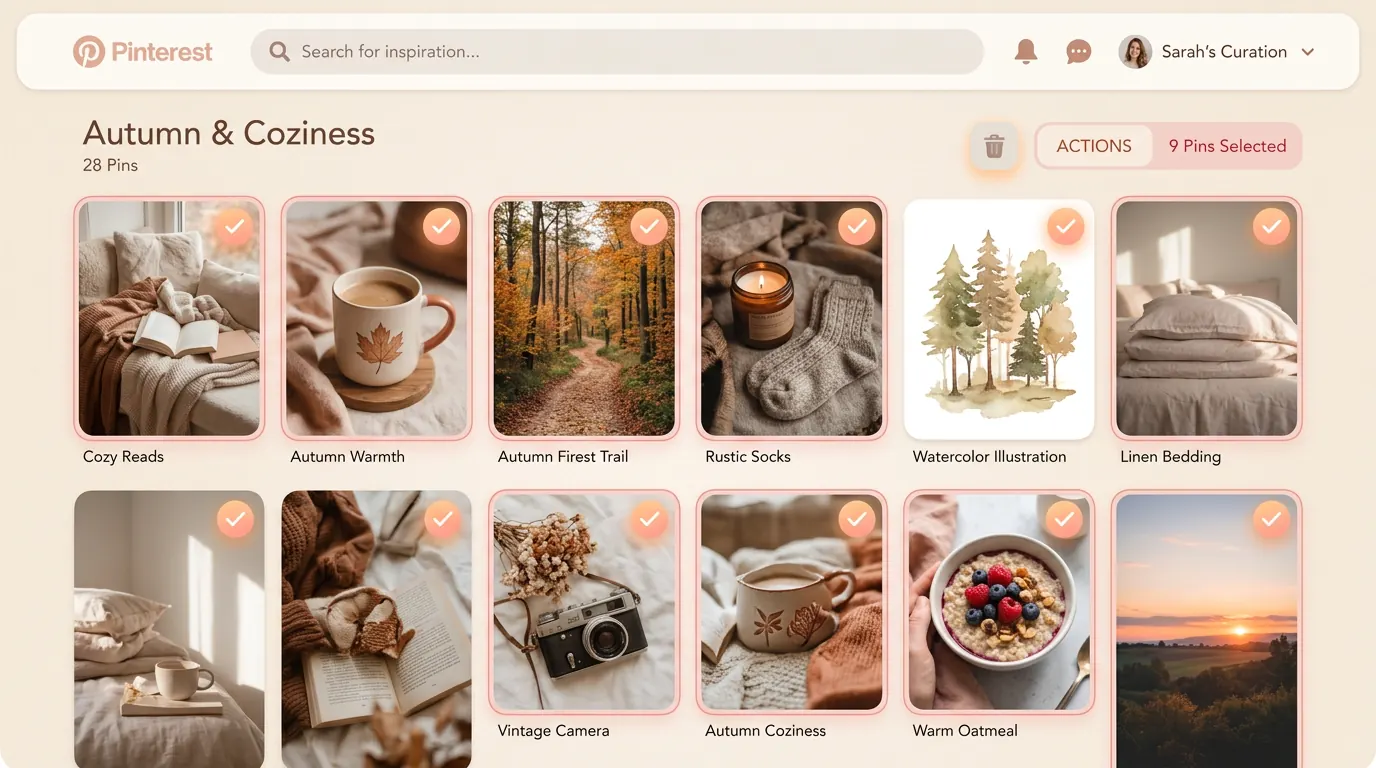
Pinterest allows you to bulk-delete, which can feel incredibly freeing.
| Device | How to Begin the Selection | Next Steps |
|---|---|---|
| Desktop | Open the board and click Organize at the top. | Click to checkmark multiple pins, then click the Trash icon at the top of the screen. |
| Mobile | Open the board and tap Select at the top. | Tap each pin you wish to remove, then tap the Trash icon at the bottom. |
Select the ones that no longer serve you. It might feel like a digital exhale.
Curating with Intention moving Forward
Once the clutter is gone, you are left with an open field. This is the perfect moment to plant new seeds.
If you are using Pinterest as a creator or a business owner, this newly cleared space is where your strategy can truly thrive. You don't just want a quiet space; you want a space that brings the right people to your doorstep.
Have you ever noticed how top creators seem to effortlessly maintain beautiful, highly-relevant boards? It often comes down to intentional creation and finding the right rhythm. If you are curious about how the creators you admire are doing it, you might find our thoughts on how to find someone on Pinterest helpful for researching their curated boards.
What Stays and What Goes?
As you begin to fill your newly cleared boards, it might help to ask yourself a few gentle questions before saving a new pin:
- Does this reflect the direction I am heading in, or the place I used to be?
- If a stranger looked at this board, would they understand my current passions or business goals?
- Does this image inspire action, or just passive scrolling?
It is okay if your aesthetic changes. It is okay if a project you were passionate about last year no longer holds your attention. Your Pinterest profile is a living document of your creative journey. By learning how to delete pins on Pinterest when they no longer serve a purpose, you give yourself the permission to evolve without carrying the weight of past ideas.
And if you are ready to fill your space with your own meaningful work, there are ways to do it without burning yourself out.
Share your ideas, effortlessly
If you have a blog full of insights but feel too tired to design pins from scratch, Redol can quietly help. We extract your best angles and create pins that resonate.
Summary
Deleting pins on Pinterest is more than just a technical task; it is an act of digital self-care. By using the edit tools—either individually via the pencil icon or in bulk via the "Organize" feature—you can permanently remove images that no longer align with your vision. Remember that deletion is final, so approach it thoughtfully. As you clear away the old, you teach the algorithm what matters to you now, ensuring that the inspiration and ideas you discover tomorrow are exactly what you need to keep growing. Take your time, breathe, and let your digital space reflect the clarity you deserve.
Related posts
About the Author

Zhang Guo
AI Product Manager · Digital Marketing Consultant
AI product manager and digital marketing consultant with a background in music. I see creativity as the bridge between rhythm and logic, where musical intuition and mathematical precision can coexist in every meaningful product decision.
Follow on X