How to Add Keywords to Pinterest: A Mindful Guide to Visibility
Learn how to add keywords to Pinterest naturally. Discover the gentle art of Pinterest SEO, optimizing your profile, boards, and pins without losing your voice.
When we pour our hearts into a creative project, a blog post, or a new design, we naturally want it to be seen. But sharing work online can sometimes feel like speaking into a crowded, noisy room. You might find yourself wondering why your beautiful, carefully curated pins are met with silence.
It is easy to blame the algorithm or assume your work simply isn't good enough. I want to assure you: it doesn't mean your work lacks value. It usually just means the platform doesn't quite understand how to categorize it yet.
Pinterest is not a traditional social network; it is a visual search engine. Just as a librarian needs to know the genre and author of a book to place it on the right shelf, Pinterest needs words to know who to show your images to. If you are trying to understand how to add keywords to Pinterest, you are simply learning how to whisper instructions to the librarian. Let's explore how to do this gently, without losing the soul of your writing.
The Philosophy of Pinterest SEO
Before we look at exactly where to type your keywords, it helps to shift our mindset. "SEO" (Search Engine Optimization) can sound like a cold, robotic term. It often brings to mind the image of "keyword stuffing"—listing unrelated words just to game a system.
Please don't do that. Pinterest's AI is highly sophisticated. It favors natural, human language. When you add keywords, you are simply anticipating the words someone else might type when they are looking for exactly what you have created. It is an act of empathy.
If you are struggling to understand how people search on the platform, you might find our foundational thoughts on how to use Pinterest helpful for grasping the platform's core intent.
Where to Add Keywords: The Three Core Layers
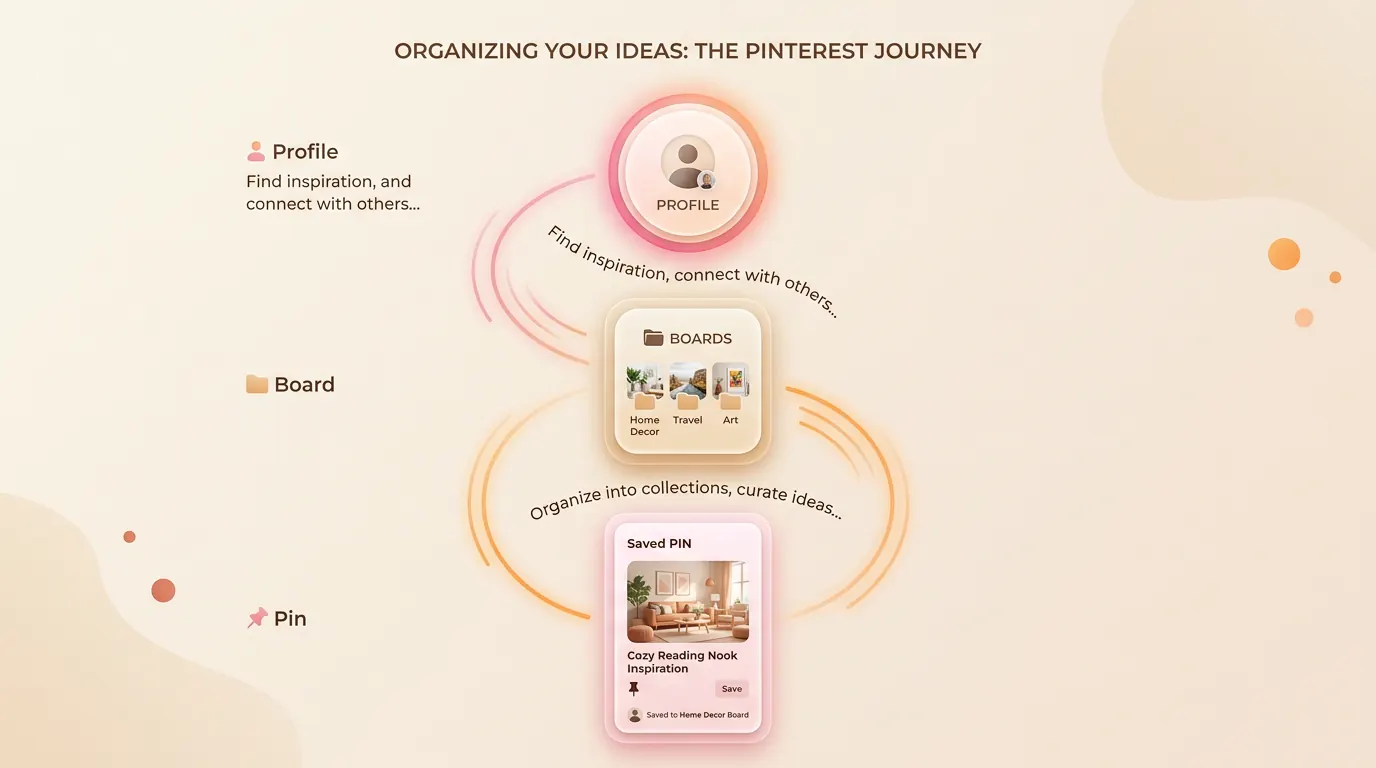
There is no single "tag" box you fill out and forget about. Adding keywords to Pinterest is a holistic practice that happens across three distinct layers of your account: your profile, your boards, and your individual pins.
Layer 1: Your Profile (The Foundation)
Your profile is your home base. It needs to tell the algorithm exactly what your entire ecosystem is about.
- Your Name: You can gently expand your display name to include your primary focus. Instead of just "Jane Doe," you might write "Jane Doe | Slow Living & Minimalist Decor."
- Your Bio: You have 160 characters to tell your story. Write a warm, inviting sentence that naturally weaves in your core topics. "Sharing mindful routines, simple recipes, and slow living inspiration for a quieter life."
Layer 2: Your Boards (The Filing Cabinets)
Boards are how Pinterest understands the context of the pins saved within them. If you name a board something clever but vague—like "Dreamscapes" or "Yum!"—the algorithm struggles to understand it.
- Board Titles: Use clear, search-friendly titles. "Cozy Bedroom Inspiration" or "Easy Vegan Dinners."
- Board Descriptions: This is a frequently missed opportunity. Write a sentence or two describing what someone will find inside the board, using related secondary keywords.
If you have old boards that no longer fit your aesthetic and their confusing keywords are dragging down your profile, you might want to gently clear them out. Our guide on how to delete Pinterest boards can walk you through that quiet process.
Layer 3: Your Pins (The Individual Seeds)
This is where you will spend most of your time. When you upload a new "Fresh Pin," you must give it a voice. According to Pinterest's Official Business Best Practices, clear text is essential for distribution.
| The Field | How to Approach It Gently |
|---|---|
| Pin Title | Place your most important keyword near the beginning. Make it clear and inviting. |
| Pin Description | Write 2-3 natural sentences. Imagine explaining the image to a friend. "If you are looking for [Keyword 1], this guide will help you build a [Keyword 2]." |
| Text Overlay | The words physically written on your image are read by Pinterest's visual AI. Ensure they match your written title. |
| Alt Text | Describe the image visually for screen readers, weaving your keyword in naturally. |
Finding the Right Words to Whisper
How do you know which words to use? You don't have to guess. The platform tells you exactly what people are seeking.
The easiest way to find your keywords is to use the Pinterest search bar. Type in a broad word related to your post, like "Garden." Before you hit enter, look at the dropdown menu. Pinterest will suggest phrases like "Garden layout ideas" or "Garden pathway." These are the exact phrases real people are typing.
You can also use the official Pinterest Trends tool to see what is gaining momentum. By aligning your work with these searches, you aren't chasing trends; you are simply stepping into the flow of an existing conversation.
Easing the Burden of Creation
Learning how to add keywords to Pinterest effectively means your work will finally reach the people who need it. But I also know that constantly researching keywords, writing descriptions, and designing new pins for every single blog post can eventually lead to creative exhaustion.
If you love writing but find the distribution process draining, it is okay to ask for a softer workflow.
Share your work without losing your peace
If you are tired of manually researching and formatting pins, Redol can help. We gently extract the essence and keywords from your blog posts, turning them into beautiful, optimized Pinterest assets.
Summary
Understanding how to add keywords to Pinterest is about learning to communicate with a visual search engine in a natural, human way. Instead of stuffing unrelated tags, focus on gently weaving your core topics into the three foundational layers of your account: your profile name and bio, your board titles and descriptions, and the titles, text overlays, and descriptions of your individual pins. By using the search bar to find the exact phrases your audience is already whispering, you build a quiet bridge between your creative work and the people who are actively searching for it. Take your time, write naturally, and trust that your work will find its home.
Related posts
About the Author

Zhang Guo
AI Product Manager · Digital Marketing Consultant
AI product manager and digital marketing consultant with a background in music. I see creativity as the bridge between rhythm and logic, where musical intuition and mathematical precision can coexist in every meaningful product decision.
Follow on X