How to Increase Pinterest Traffic with Better Outbound Clicks
Improve Pinterest website traffic with relevant Pins, working destination links, outbound-click measurement, and practical conversion checks.
Topic: Pinterest guides
To increase Pinterest traffic to your website, publish Pins that promise a specific useful answer, link them to the page that delivers it, and measure outbound clicks. First check that existing Pins have working links. More impressions, saves, or followers do not automatically mean more visitors.
A useful traffic workflow is: relevant search question → accurate Pin → matching destination → measured website action. Improve the weakest part of that path before scaling content production.
Measure website traffic rather than Pin opens
Pinterest defines an outbound click as an action that leads away from Pinterest. A Pin click can simply open the Pin's close-up view. Saves mean someone kept the idea. Pinterest's Analytics metric definitions distinguish these actions and note that outbound-click measurement begins when a link is added.
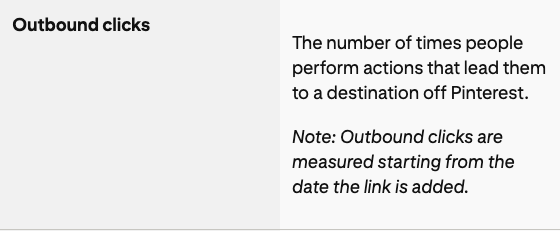
Official Help Center excerpt, captured October 12, 2026; this is a metric definition, not account-performance evidence.
| Measure | What you learn | What it cannot establish alone |
|---|---|---|
| Impressions | How often a Pin appeared on screen | Whether people visited your site |
| Saves | Whether viewers kept the idea | Whether they opened the destination |
| Outbound clicks | Actions leading off Pinterest | Completed purchases or exact website session counts |
| Website sessions and conversions | What your own site recorded | All activity that tracking could not observe |
Use a business account for Pinterest reporting. On desktop, select a Pin from the Created area of your profile and open its expanded stats. Pinterest's Pin stats guide also explains the app path. Record the date range, source, and organic/paid filter so comparisons use the same basis.
Audit the destination before making more Pins
Open a recent Pin and follow its actual destination link. Test on a phone as well as a desktop browser. Do not rely on the URL merely looking correct in an editor.
Check these points:
- The link reaches the intended public page, without a broken redirect or unexpected login screen.
- The page answers the promise on the Pin. A “small kitchen storage checklist” should not lead to an unrelated home page.
- The important answer is readable without navigating past excessive overlays or unrelated introductions.
- A product is still available, and a download or signup works.
- The next action is clear: read the instructions, view the item, download the file, or join the list.
Keep the useful idea from the original traffic strategy: make distinct visual angles and deliver on each promise. Evaluate page usefulness through your own visitor experience and website reports, rather than trying to infer an undocumented dwell-time threshold.
Match a real question to one useful page
Search the subject on Pinterest and inspect the results to understand the wording and visual context. Then choose a question your page can answer well. Autocomplete and results are research clues, not audited search-volume figures.
For a page about compact kitchens, possible angles include “renter-friendly cabinet storage,” “how to measure a narrow cupboard,” or “a checklist before buying kitchen organizers.” Use only the angles actually covered on the destination.
| Page content | Appropriate Pin promise | Mismatch to avoid |
|---|---|---|
| A measurement checklist | “Measure your cupboard before buying storage” | “Ten kitchen products” when no product list exists |
| A comparison with dimensions | “Choose a divider that fits a shallow drawer” | A generic inspiration image with no explanation |
| An original project walkthrough | “A removable storage setup for renters” | Presenting a reference image as your completed project |
Write a readable title and description that explain the benefit. Use text on the image when it helps a viewer understand the task, and describe the image accurately in alt text where provided. Keywords should clarify the subject rather than overwhelm it.
Try genuinely different creative angles
A checklist graphic, an original project photograph, and a comparison can each introduce the same page differently. Each should add a meaningful perspective. Publishing cosmetic duplicates is not the same as testing a new idea.
Keep the destination stable while trying one useful creative change. For example, compare a measurement diagram with a finished-room photo for the same checklist. Record the publication dates and judge both over comparable windows; a Pin published yesterday has had less opportunity than one published several weeks ago.
There is no guaranteed number of Pins per article or universal posting time. Choose a cadence you can review and maintain. For a blog-based workflow, Redol's Blog to Pinterest tool can draft titles, descriptions, and image prompts. Check the output against your page and verify every link before publishing.
Use seasonal evidence from the relevant region
Pinterest Trends can show changes in search, saving, and shopping interest. Select the region that matches your audience, then examine when interest starts rising for the specific subject. Work backward from that pattern and the time you need to prepare useful content; do not apply the same “post months early” rule to every topic.
The official Trends guide explains that keyword graphs use normalized values, with the highest point indexed to 100. A value of 100 is not 100 searches. Some features are being tested or limited by region, and audience-specific trends may be unavailable when the audience is too small.
If a relevant trend is unavailable, use actual search results and your own reporting instead of inventing demand or timing data.
Compare click rate with useful volume
Outbound click rate is outbound clicks divided by impressions. A hypothetical Pin with 20 clicks from 1,000 impressions has a 2% rate. Another with 50 clicks from 5,000 impressions has a 1% rate, but sends more total clicks. These are illustrative calculations, not results or targets.
Track both the rate and the count. A high rate based on a tiny sample is a weak basis for a major production decision. Compare similar topics, time windows, and distribution types before deciding that one design is a winner.
For website analysis, use consistent campaign parameters if your analytics supports them, such as utm_source=pinterest and a distinct utm_content for each creative. Keep parameters stable and do not include personal information. Pinterest outbound clicks and website sessions may differ because they measure different events and tracking can be incomplete; investigate large gaps rather than forcing the totals to match.
Diagnose the weak link
| What you observe | Possible explanation to check | Practical next action |
|---|---|---|
| Few impressions | Limited demand, unclear topic, or insufficient observation time | Revisit search relevance and compare a longer window |
| Many impressions, few outbound clicks | The image inspires saving but gives little reason to visit, or the link is missing | Verify the link and clarify what the destination adds |
| Outbound clicks rise, website activity does not | Redirect or tracking problems | Test the actual link and check website reporting |
| Visits rise, conversions do not | Offer, usability, or audience mismatch | Review the landing page and next action |
| Saves rise without clicks | The Pin may satisfy the immediate task or be kept for later | Make the destination's additional value clear without withholding essential facts |
These are investigation paths, not confirmed causes. Change one relevant element, save the comparison, and keep or revise it based on evidence.
A practical review routine
Review links and destinations first. Then compare the same reporting window for your recent Pins, noting outbound clicks, rate, and the website action you care about. Continue the useful topics, repair mismatched promises, and retire broken destinations from your plan.
The reporting details were checked against Pinterest documentation on October 12, 2026. The examples are instructional; no traffic benchmark, hidden ranking formula, or growth guarantee is claimed. For monetization after the visit, see ways to make money with Pinterest, or browse the Pinterest guides.
Related posts
About the Author

Zhang Guo
AI Product Manager · Digital Marketing Consultant
AI product manager and digital marketing consultant with a background in music. I see creativity as the bridge between rhythm and logic, where musical intuition and mathematical precision can coexist in every meaningful product decision.
Follow on X